Cyber Insurance Backup Requirements Canada: What Insurers Verify in 2026
Having backups and proving backups are two different things. Most Canadian SMBs have some form of backup in place. Very few can demonstrate — with documented evidence — that those backups work, are current, are stored offsite, and have been restore-tested.
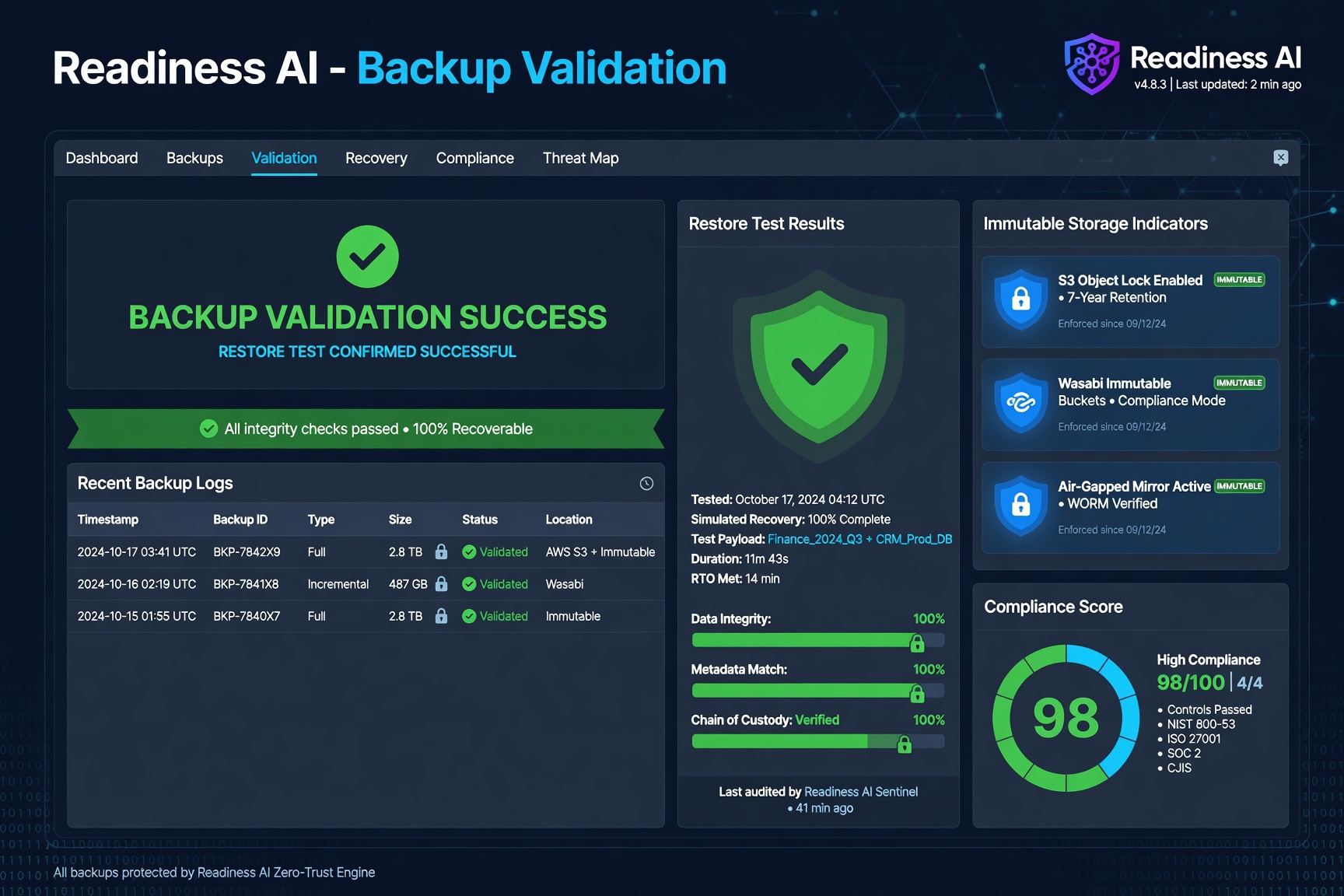
Cyber insurers know this. It’s why backup-related questions on renewal applications have become more specific, and why unverified backup claims are increasingly flagged during underwriting.
What Backup Verification Actually Means
Backup verification is the documented process of confirming that:
- Backups are running on schedule and completing without errors
- Backup data is stored in at least one offsite or cloud location separate from production systems
- Backup data is immutable — it cannot be encrypted or deleted by ransomware or an insider
- Restore tests have been conducted recently and the results are documented
- Recovery time and recovery point objectives are defined and achievable
Self-attestation — checking a box on an insurance application that says “yes, we have backups” — is not backup verification. Insurers and their underwriters are asking for more, and the gap between what SMBs claim and what they can demonstrate is creating real problems at renewal.
Why Backup Verification Matters for Cyber Insurance
Ransomware recovery depends almost entirely on backup quality. If backups are connected to production systems, the ransomware encrypts them too. If the last restore test was two years ago, no one knows whether recovery is actually possible. If there’s no documented RPO, the business has no defined tolerance for data loss.
Insurers have paid out on claims where backup failures turned a manageable incident into a complete data loss event. As a result, backup controls have become a primary focus of cyber underwriting in Canada. A business that cannot document its backup posture faces higher premiums, coverage exclusions, or outright denial.
See also: Cyber Insurance Evidence and Ransomware Recovery Readiness.
The Backup Evidence Package Insurers Want to See
When a Canadian insurer or broker asks about your backups, here is what a complete evidence package looks like:
- Backup schedule documentation — what is being backed up, how often, and to where
- Completion logs — recent backup job logs showing successful completion
- Offsite / cloud storage confirmation — evidence that a copy exists outside the primary environment
- Immutability confirmation — documentation showing backup data cannot be modified or deleted during the retention period
- Restore test record — date, scope, and result of the most recent restore test
- RTO/RPO documentation — defined recovery time and recovery point objectives with sign-off
- Backup scope confirmation — confirmation that critical systems, databases, and files are included
Most Canadian SMBs have some of this. Few have all of it documented in a format that holds up under insurer review.
Cyber Insurance Backup Requirements by Coverage Tier
Backup requirements in Canada scale with your coverage limit and industry sector. Understanding what your tier requires helps you prepare the right evidence before renewal:
| Coverage Limit | Backup Frequency | Immutability Required | Restore Test Cadence |
|---|---|---|---|
| Under $500K | Daily incremental | Preferred, not always required | Annual minimum |
| $500K – $1M | Daily incremental, weekly full | Required at renewal | Annual; documentation required |
| $1M – $3M | Daily, with offsite replication | Required; evidence expected | Semi-annual recommended |
| Over $3M | Hourly or continuous for critical systems | Required; WORM confirmation | Quarterly; documented results |
Organizations in regulated sectors — healthcare (PIPEDA, PHIPA), legal (LSO requirements), and financial services (OSFI E-21) — face stricter backup requirements at all tiers. If your organization handles personal health information or is subject to federal regulatory oversight, assume your insurer will ask for more than the tier minimums above.
Immutability Requirements: What Canadian Insurers Accept
Immutability is the single most scrutinized backup control in Canadian cyber underwriting. An immutable backup cannot be modified, encrypted, or deleted during a defined retention period — even by an administrator. This matters because ransomware actors specifically target backup systems. If your backup data can be encrypted, it provides no recovery value.
What Counts as Immutable for Insurance Purposes
Accepted immutability implementations in Canadian cyber underwriting include: AWS S3 Object Lock (Compliance mode), Azure Blob Storage immutability policies, Veeam immutable backup repositories, Wasabi Object Lock, Backblaze B2 with Object Lock enabled, and air-gapped tape backups with physical custody controls. Note: “immutable” as a marketing feature on a backup product is not sufficient — the underlying storage must enforce a no-delete, no-modify policy at the infrastructure level.
What Does NOT Count as Immutable
Common configurations that Canadian insurers do not accept as immutable: standard cloud storage without Object Lock (e.g., an S3 bucket with Object Lock disabled), versioning-only policies that allow deletion of all versions, backup copies on NAS devices accessible via standard network credentials, and “immutable” WORM settings that can be changed by an admin during the retention period. If you’re unsure, ask your backup vendor to confirm whether their implementation meets WORM (Write Once Read Many) standards.
Immutability Retention Periods
Most Canadian insurers expect immutability locks of at least 30 days. This ensures that even if ransomware has been dormant in your environment for weeks before triggering, you have a clean recovery point. Higher-risk sectors (healthcare, legal, financial) are increasingly expected to demonstrate 90-day immutability retention.
Backup Verification for Engineering and Professional Services Firms
This creates two questions that standard backup verification doesn’t address:
Engineering firms, architecture practices, and research organizations face an additional layer of complexity. Their backup environment often includes large project file libraries, CAD files, simulation data, and client deliverables that may carry confidentiality obligations.
- Where is backup data being stored, and is that storage location consistent with client or regulatory data handling requirements?
- Who has access to backup recovery operations, and is that access controlled and documented?
For firms working on government or infrastructure projects in Alberta or nationally, backup data handling can trigger contractual obligations that go beyond standard insurer requirements. See Engineering Firm Cyber Readiness and Private Cyber Verification for context on private backup verification options.
How Readiness AI Supports Backup Verification
Readiness AI’s cyber control verification workflow includes a structured backup verification module. The workflow prompts your team to document each component of your backup posture, flags gaps against insurer requirements, and generates an evidence package in a format suitable for broker submission or insurer review.
For firms that require it, backup verification evidence can be managed through a private Node deployment — keeping backup records and restore test documentation out of shared cloud environments.
How to Prepare Backup Evidence for Your Insurance Renewal
Preparing backup evidence before your renewal submission reduces friction with your broker and strengthens your underwriting position. Here is a structured approach:
Step 1: Run a Backup Coverage Audit
Log into your backup platform and export a full coverage report. Confirm which systems, servers, and databases are included in the backup schedule. Compare against your asset inventory to identify any excluded systems. Document the exclusions and reason — insurers prefer honest disclosure of gaps to discovering them post-incident.
Step 2: Export Recent Job Completion Logs
Export your backup job logs for the past 30–90 days. What insurers want to see: jobs completing successfully, errors that were flagged and resolved, and backup frequency matching your stated schedule. A pattern of failed jobs that weren’t investigated is a red flag in underwriting.
Step 3: Confirm Offsite or Cloud Storage
Document where your offsite or cloud backup copy lives. A screenshot of the cloud storage configuration or backup target settings is acceptable. Insurers want to confirm this copy is separate from your primary environment — not just a second local copy on a different drive in the same location.
Step 4: Confirm and Document Immutability
Provide documentation showing immutability is enabled. Acceptable evidence: a WORM policy settings screenshot, a Veeam immutable backup repository configuration, an S3 Object Lock policy, or an MSP service confirmation. If immutability is not currently enabled, document this as a gap with a remediation timeline before submitting.
Step 5: Record Your Most Recent Restore Test
Prepare a restore test record: date of test, which system or dataset was restored, the outcome, and who performed it. This doesn’t need to be a formal report — a one-page summary with sign-off is sufficient for most Canadian insurer renewal submissions.
Step 6: Document Your RTO and RPO Definitions
Record your defined recovery time objective (RTO) and recovery point objective (RPO) with sign-off from a business decision-maker. Insurers ask for these at coverage limits above $1M. If you haven’t defined them formally, your cyber insurance renewal checklist is a good starting point.
Frequently Asked Questions
What is backup verification?
Backup verification is the documented process of confirming that an organization’s backups are running, current, stored offsite, immutable, and restore-tested. It is the difference between believing your backups work and being able to prove it with evidence.
Why do cyber insurers ask about backup verification?
Ransomware recovery depends almost entirely on backup quality. Insurers have paid out on claims where backup failures turned manageable incidents into complete data loss. Backup controls are now a primary focus of cyber underwriting in Canada, and unverified backup claims are flagged during renewal.
What is the difference between having backups and verifying backups?
Having backups means a backup process is in place. Verifying backups means you have documented evidence that the process is running correctly, producing complete and usable recovery points, storing data offsite and immutably, and that you have tested restoration within a defined timeframe.
How often should restore tests be documented for cyber insurance?
Most Canadian cyber insurers expect restore tests to be conducted and documented at least annually. Some insurers and higher-risk sectors expect quarterly testing. The key is that the test result is recorded — date, scope, outcome — not just that a test was performed.
Can Readiness AI help document backup verification for an insurance renewal?
Yes. Readiness AI’s backup verification workflow guides your team through documenting each component of your backup posture and generates an evidence package formatted for broker or insurer review. Start with a Readiness Review to assess your current backup evidence gaps.
Backup Verification in the Context of Cyber Insurance Requirements
Backup verification is one of three critical controls that Canadian insurers evaluate at both initial application and renewal. The other two are MFA enforcement and EDR coverage on all endpoints. For a complete overview of all controls insurers verify, including the evidence required for each, see the cyber insurance requirements guide for Canadian businesses. To understand how backup verification fits within your renewal preparation, use the cyber insurance renewal checklist. When completing your insurance application, the cyber insurance questionnaire preparation guide explains exactly how backup questions are framed and scored.
For the complete small business cyber insurance requirements guide — covering MFA, EDR, backups, incident response, and patching — see Small Business Cyber Insurance Requirements in Canada.
Ready to verify and document your backup posture? Get a Readiness Review. Related: Cyber Insurance Evidence | Ransomware Recovery Readiness | Cyber Control Verification | Engineering Firm Cyber Readiness | Verified Cyber Controls